


 Homepage
 Forum
Forum Drivers
 HMM-Manuals
 MTM
MTM Feed
Feed
Hi,
I bought an E530 very cheaply on ebay, ex-corporate machine - the description said boots to bios, no hdd, and 4GB ram.
It did indeed boot to bios when I received it, the time/date was wrong so I corrected that in bios, but when I rebooted it was wrong again so I installed a new cmos battery. Before doing anything else I set about giving it a good clean - I cleaned the keyboard keys, then took out the fan to clean dust away but as I pulled out the connector the black wire came loose, so I ordered a replacement fan from ebay. Fitted that, along with an SSD, then inserted a flash drive to install a linux distro. At this point things started going wrong - it wouldn't even boot to bios.
In short, the green light is lit on the power port when I plug in and the red dot is lit on the 'thinkpad' logo. When I press the power button, the fan starts for a couple of seconds and stops, then starts again for another couple of seconds, then stops. Nothing on the display. If I leave it like that, between three and five minutes later the fan starts again and stays on, presumably to cool the cpu - still nothing on the screen.
I've done the basic steps like discharging the power, tried battery/ac adapter only, checked the LCD cable, disconnected the keyboard, trackpad, and anything else I could see, and I get beeps when I remove the ram, still nothing on the screen.
I'm as far as I can go now with my limited knowledge, so do I need a new system board? - or do the beeps and lights suggest the board isn't the problem??
Thanks for any input!
Take a look at our
ThinkPads.com HOME PAGE
For those who might want to contribute to the blog, start here: Editors Alley Topic
Then contact Bill with a Private Message
ThinkPads.com HOME PAGE
For those who might want to contribute to the blog, start here: Editors Alley Topic
Then contact Bill with a Private Message
E530 not booting
-
RealBlackStuff
- Admin Emeritus

- Posts: 24730
- Joined: Mon Sep 18, 2006 5:17 am
- Location: Loch Garman, Éire
Re: E530 not booting
Welcome to the Forum.
Did you see anything on the screen when you first got it?
Did you take out the charger and the main battery before you started 'cleaning up'?
Have you tried an external monitor?
If you shine a torch at the screen from the side, can you vaguely see anything on it?
If so, you blew the Fuse for the LCD backlight.
Unfortunately the E530 schematics do not show any fuse or fuse-location for that, but it must be near the motherboard LCD-connector.
Did you see anything on the screen when you first got it?
Did you take out the charger and the main battery before you started 'cleaning up'?
Have you tried an external monitor?
If you shine a torch at the screen from the side, can you vaguely see anything on it?
If so, you blew the Fuse for the LCD backlight.
Unfortunately the E530 schematics do not show any fuse or fuse-location for that, but it must be near the motherboard LCD-connector.
Lovely day for a Guinness! (The Real Black Stuff)
But I actually prefer Murphy's from Cork!
But I actually prefer Murphy's from Cork!
Re: E530 not booting
Many thanks for the reply and the welcome, RBS.RealBlackStuff wrote: ↑Thu Nov 21, 2024 12:56 amWelcome to the Forum.
Did you see anything on the screen when you first got it?
Did you take out the charger and the main battery before you started 'cleaning up'?
Have you tried an external monitor?
If you shine a torch at the screen from the side, can you vaguely see anything on it?
If so, you blew the Fuse for the LCD backlight.
Unfortunately the E530 schematics do not show any fuse or fuse-location for that, but it must be near the motherboard LCD-connector.
When I first got the laptop it booted to bios, so it was definitely working then - but I needed to wait a couple of days for a new cmos battery and a replacement fan before I could insert an ssd and install an OS.
In the meantime, I removed the battery and the adapter before I cleaned the keyboard lightly with minimal rubbing alcohol on a rag. The cmos battery arrived, I put it in and changed the date/time in bios, inserted the new fan, and everything was good in my world. Plugged in a USB stick to install an OS.........and....nothing

I've tried the external monitor thing and nothing is detected - I've shone a torch at the screen and can't see anything.
It sounds like I've somehow messed the thing up at some point, but from reading online it seems the Edge series can be problematic at times with this sort of thing - hopefully you have some more ideas I can look into

Thanks again RBS
-
RealBlackStuff
- Admin Emeritus
- Posts: 24730
- Joined: Mon Sep 18, 2006 5:17 am
- Location: Loch Garman, Éire
Re: E530 not booting
Get the Edge E530 manual from the HMM-Manuals link above.
Check the USB port that caused the problem (and all other ports), it might be broken inside and cause a short.
Always remove charger and main battery before you work on the LCD.
Go to Chapter 9, section 1210 LCD Unit, remove/reinsert the LCD cable properly.
Connect only the charger, try to boot.
Check the USB port that caused the problem (and all other ports), it might be broken inside and cause a short.
Always remove charger and main battery before you work on the LCD.
Go to Chapter 9, section 1210 LCD Unit, remove/reinsert the LCD cable properly.
Connect only the charger, try to boot.
Lovely day for a Guinness! (The Real Black Stuff)
But I actually prefer Murphy's from Cork!
But I actually prefer Murphy's from Cork!
Re: E530 not booting
I don't suppose I can do anything about a possible faulty USB port as I'm guessing they're soldered to the motherboard ?RealBlackStuff wrote: ↑Fri Nov 22, 2024 2:27 amGet the Edge E530 manual from the HMM-Manuals link above.
Check the USB port that caused the problem (and all other ports), it might be broken inside and cause a short.
Always remove charger and main battery before you work on the LCD.
Go to Chapter 9, section 1210 LCD Unit, remove/reinsert the LCD cable properly.
Connect only the charger, try to boot.
I took the thing apart for the 50th time and carefully reseated the LCD cable - while I was at it I reseated all the other cables. Put it all together again, and I'm now getting 1-3-3-1 beeps when I turn it on , which apparently could be RAM

I changed the dimm for a known-working one and no change.
I think it's time to splash out on a replacement motherboard on eBay for about £15, and if it doesn't work after that, this laptop will be going through the window !
Many thanks RBS

-
IrishMASMS
- Posts: 22
- Joined: Sat Nov 30, 2024 10:49 pm
- Location: Santa Clara, CA
- Contact:
Re: E530 not booting
(First post! Been lurking for a few months now since I caught the ThinkPad bug, and saw this post that I could help with so I created an account (Finally))
Hey chrisBe - I was researching what I could do with the E530 I saved from a local ewaste facility and came across your post.
For your issues, and with the dead & replaced CMOS battery have you confirmed USB and USB3 is enabled in the BIOS? Along with all the other settings you should have enabled in the BIOS? With the CMOS battery dead, it lost all the settings so you will need to reconfigure the BIOS.
Also,
- for that first boot to install you need to configure the BIOS for secure boot
- selecting the USB drives as higher priority in the boot order.
- Did you try all the USB port(s) with the USB drive?
Make sure you have the BIOS configured and enabled for your USB ports, and for booting to install a fresh operating system.
I ran into a dead/broken USB port with a different model thinkpad (but of this era/age of thinkpads) - someone broke the plastic tab inside the USB port!
From my research, it depends on which USB port has the issue and is it with the port itself or the chip/controller for that port. Luckily for me the broken USB port was on a smaller "daughtercard" (for a lack of a better term) that attached to the motherboard. Therew was no other damage to the board or the chips, and I was able to get it booted & started installation with a different USB port. But that broken USB port bugs the hell out of me. So I had two options:
1) purchase a replacement daughter card and swap it out
2) pull a USB port from a known bad motherboard and replace the port with some careful soldering
Luckily I had a dead motherboard that has a suitable replacement; and someone in the local vintage computer community is better at such surface soldering than I am that owes me a favor. The board and replacement is on his bench awaiting the fix. Hopefully this will resolve the issue (fingers crossed).
In short, you have other options if the USB port is really broken or dead. Good luck, and let us know how you make out.
Hey chrisBe - I was researching what I could do with the E530 I saved from a local ewaste facility and came across your post.
For your issues, and with the dead & replaced CMOS battery have you confirmed USB and USB3 is enabled in the BIOS? Along with all the other settings you should have enabled in the BIOS? With the CMOS battery dead, it lost all the settings so you will need to reconfigure the BIOS.
Also,
- for that first boot to install you need to configure the BIOS for secure boot
- selecting the USB drives as higher priority in the boot order.
- Did you try all the USB port(s) with the USB drive?
Make sure you have the BIOS configured and enabled for your USB ports, and for booting to install a fresh operating system.
I ran into a dead/broken USB port with a different model thinkpad (but of this era/age of thinkpads) - someone broke the plastic tab inside the USB port!
From my research, it depends on which USB port has the issue and is it with the port itself or the chip/controller for that port. Luckily for me the broken USB port was on a smaller "daughtercard" (for a lack of a better term) that attached to the motherboard. Therew was no other damage to the board or the chips, and I was able to get it booted & started installation with a different USB port. But that broken USB port bugs the hell out of me. So I had two options:
1) purchase a replacement daughter card and swap it out
2) pull a USB port from a known bad motherboard and replace the port with some careful soldering
Luckily I had a dead motherboard that has a suitable replacement; and someone in the local vintage computer community is better at such surface soldering than I am that owes me a favor. The board and replacement is on his bench awaiting the fix. Hopefully this will resolve the issue (fingers crossed).
In short, you have other options if the USB port is really broken or dead. Good luck, and let us know how you make out.
IrishMASMS
Current ThinkPads:
P70 running Windows 10
P1 running Windows 11
T430s running Windows 11 LTSP
On the workbench:
T43p
X220
X230
W510 for OpenMediaVault (OMV)
Current ThinkPads:
P70 running Windows 10
P1 running Windows 11
T430s running Windows 11 LTSP
On the workbench:
T43p
X220
X230
W510 for OpenMediaVault (OMV)
-
RealBlackStuff
- Admin Emeritus
- Posts: 24730
- Joined: Mon Sep 18, 2006 5:17 am
- Location: Loch Garman, Éire
Re: E530 not booting
Here is a picture of a broken USB-port:
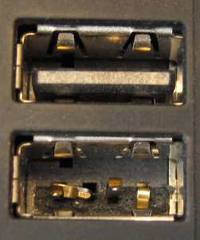
Maybe the plastic is missing in one of your ports?
Look at the metal pins in the lower port on that picture.
If any of those pins makes contact with another pin or the metal surround, your laptop will not boot.
By "disconnecting" them from each other, the laptop could/should start again, if that was the only problem.
So did you CHECK those ports?
Maybe the plastic is missing in one of your ports?
Look at the metal pins in the lower port on that picture.
If any of those pins makes contact with another pin or the metal surround, your laptop will not boot.
By "disconnecting" them from each other, the laptop could/should start again, if that was the only problem.
So did you CHECK those ports?
Lovely day for a Guinness! (The Real Black Stuff)
But I actually prefer Murphy's from Cork!
But I actually prefer Murphy's from Cork!
Re: E530 not booting
Hi, thanks for the help IrishMASMS.IrishMASMS wrote: ↑Sat Nov 30, 2024 11:11 pm(First post! Been lurking for a few months now since I caught the ThinkPad bug, and saw this post that I could help with so I created an account (Finally))
Hey chrisBe - I was researching what I could do with the E530 I saved from a local ewaste facility and came across your post.
For your issues, and with the dead & replaced CMOS battery have you confirmed USB and USB3 is enabled in the BIOS? Along with all the other settings you should have enabled in the BIOS? With the CMOS battery dead, it lost all the settings so you will need to reconfigure the BIOS.
Also,
- for that first boot to install you need to configure the BIOS for secure boot
- selecting the USB drives as higher priority in the boot order.
- Did you try all the USB port(s) with the USB drive?
Make sure you have the BIOS configured and enabled for your USB ports, and for booting to install a fresh operating system.
I ran into a dead/broken USB port with a different model thinkpad (but of this era/age of thinkpads) - someone broke the plastic tab inside the USB port!
From my research, it depends on which USB port has the issue and is it with the port itself or the chip/controller for that port. Luckily for me the broken USB port was on a smaller "daughtercard" (for a lack of a better term) that attached to the motherboard. Therew was no other damage to the board or the chips, and I was able to get it booted & started installation with a different USB port. But that broken USB port bugs the hell out of me. So I had two options:
1) purchase a replacement daughter card and swap it out
2) pull a USB port from a known bad motherboard and replace the port with some careful soldering
Luckily I had a dead motherboard that has a suitable replacement; and someone in the local vintage computer community is better at such surface soldering than I am that owes me a favor. The board and replacement is on his bench awaiting the fix. Hopefully this will resolve the issue (fingers crossed).
In short, you have other options if the USB port is really broken or dead. Good luck, and let us know how you make out.
My problem at the moment is that I cannot even get into the bios to change any settings as the machine doesn't boot, so I have no display.
You will see from my previous post that I'm now getting 1-3-3-1 beeps (usually ram problems) when I switch on (still no display), even though I changed the dimm module for a known-working one - so maybe those beeps are pointing to another fault on the motherboard.
The three USB ports on the left of the machine all have the blue plastic intact and nothing looks untoward - obviously I cannot remember which port I plugged the usb stick into, and I don't want to go down the route of soldering new usb ports

The single usb port on the right of the machine (always on usb) has mangled pins inside it, but that port connects to the motherboard via a daughterboard, which I have disconnected, so that problem is out of the equation !
I was considering buying a used working motherboard on ebay, but I was reading online about somebody with a similar problem - he bought another motherboard but the same problem existed after he fitted it.
I've spent too much time and cursed/swore far too much at this £20 laptop, so I'm contemplating reselling back on ebay for spares or repair (which is how I bought it), and then forgetting I ever laid eyes on it.
Many thanks again, it's much appreciated.
-
RealBlackStuff
- Admin Emeritus
- Posts: 24730
- Joined: Mon Sep 18, 2006 5:17 am
- Location: Loch Garman, Éire
Re: E530 not booting
You replaced the fan, did you also clean/replace the thermal paste between fan and CPU?
Take out the RAM again, use an eraser to rub all the gold contacts on both RAM modules until they shine, blow off any remnants and put it back in, making sure they are 'seated' properly.
Next, remove the wifi-card, if that is faulty the laptop would also not start.
Can it boot now, after doing all of the above?
Take out the RAM again, use an eraser to rub all the gold contacts on both RAM modules until they shine, blow off any remnants and put it back in, making sure they are 'seated' properly.
Next, remove the wifi-card, if that is faulty the laptop would also not start.
Can it boot now, after doing all of the above?
Lovely day for a Guinness! (The Real Black Stuff)
But I actually prefer Murphy's from Cork!
But I actually prefer Murphy's from Cork!
Re: E530 not booting
Yes, whenever I removed the fan/heatsink I cleaned the old paste off with alcohol then re-pasted with Arctic silver.RealBlackStuff wrote: ↑Mon Dec 02, 2024 12:01 amYou replaced the fan, did you also clean/replace the thermal paste between fan and CPU?
Take out the RAM again, use an eraser to rub all the gold contacts on both RAM modules until they shine, blow off any remnants and put it back in, making sure they are 'seated' properly.
Next, remove the wifi-card, if that is faulty the laptop would also not start.
Can it boot now, after doing all of the above?
I've re-seated the ram modules umpteen times including using the eraser trick, but I did it again this afternoon along with removing the wifi card, and nothing has changed.
I'm now thinking about trying a fix advised on this forum (viewtopic.php?t=111954) where a motherboard is baked in an oven to re-flow the solder to cure possible cold joints - I've nothing to lose so I may go for it when I pluck up the courage !
Thanks again RBS
-
RealBlackStuff
- Admin Emeritus
- Posts: 24730
- Joined: Mon Sep 18, 2006 5:17 am
- Location: Loch Garman, Éire
Re: E530 not booting
Did you also check that the CPU is secured properly?
See HMM page 83, step 3.
FYI: there are 36 CPUs in the E530 parts list, maybe you have one to try?
See HMM page 83, step 3.
FYI: there are 36 CPUs in the E530 parts list, maybe you have one to try?
Lovely day for a Guinness! (The Real Black Stuff)
But I actually prefer Murphy's from Cork!
But I actually prefer Murphy's from Cork!
Re: E530 not booting
Yes, CPU was secured correctly - my (fully-working) T520 has a CPU which is on the parts list so I swapped that into the E530, but it didn't make any difference.
Thanks for the help RBS - any more ideas I can try before I give up on this?
Thanks for the help RBS - any more ideas I can try before I give up on this?
-
IrishMASMS
- Posts: 22
- Joined: Sat Nov 30, 2024 10:49 pm
- Location: Santa Clara, CA
- Contact:
Re: E530 not booting
Ooof, sorry for misreading your post. @chrisBe
This sounds frustrating as all hell. No more suggestions from me; seems your E530 has given up the ghost/the magic smoke that runs all electronics. Try cannibalizing the parts for other systems to give others new life, and ewaste the rest. Give it a proper funeral. There have been a few ThinkPads that my time invested was not a good ROI, but I did my best.
This sounds frustrating as all hell. No more suggestions from me; seems your E530 has given up the ghost/the magic smoke that runs all electronics. Try cannibalizing the parts for other systems to give others new life, and ewaste the rest. Give it a proper funeral. There have been a few ThinkPads that my time invested was not a good ROI, but I did my best.
IrishMASMS
Current ThinkPads:
P70 running Windows 10
P1 running Windows 11
T430s running Windows 11 LTSP
On the workbench:
T43p
X220
X230
W510 for OpenMediaVault (OMV)
Current ThinkPads:
P70 running Windows 10
P1 running Windows 11
T430s running Windows 11 LTSP
On the workbench:
T43p
X220
X230
W510 for OpenMediaVault (OMV)
-
RealBlackStuff
- Admin Emeritus
- Posts: 24730
- Joined: Mon Sep 18, 2006 5:17 am
- Location: Loch Garman, Éire
Re: E530 not booting
If you have only 1 RAM module, did you try it in both slots?
(After this I'm out of ideas for the moment).
(After this I'm out of ideas for the moment).
Lovely day for a Guinness! (The Real Black Stuff)
But I actually prefer Murphy's from Cork!
But I actually prefer Murphy's from Cork!
Re: E530 not booting
Thanks again RBS and IrishMASMS,
Being a glutton for punishment, I bought a working used motherboard from ebay (£12) and hoped that would solve things - it didn't. Exact same problem still exists - lights come on when power cable is inserted, the fan starts up for about three seconds then turns off again without any display. The 1-3-3-1 beeps have stopped though, so that's a small victory at least
Thinking logically, it's probably safe to assume the original motherboard wasn't faulty because the new mb shows the same symptoms - therefore the problem is probably staring me in the face.
I would love to know what's causing this, just for peace of mind.
RBS, yes I tried all combinations with the ram - one stick at a time in both slots, two sticks together, and even trying ram from my working T520.
If anybody can point me at anything else I can check, it would be appreciated.
Being a glutton for punishment, I bought a working used motherboard from ebay (£12) and hoped that would solve things - it didn't. Exact same problem still exists - lights come on when power cable is inserted, the fan starts up for about three seconds then turns off again without any display. The 1-3-3-1 beeps have stopped though, so that's a small victory at least
Thinking logically, it's probably safe to assume the original motherboard wasn't faulty because the new mb shows the same symptoms - therefore the problem is probably staring me in the face.
I would love to know what's causing this, just for peace of mind.
RBS, yes I tried all combinations with the ram - one stick at a time in both slots, two sticks together, and even trying ram from my working T520.
If anybody can point me at anything else I can check, it would be appreciated.
-
RealBlackStuff
- Admin Emeritus
- Posts: 24730
- Joined: Mon Sep 18, 2006 5:17 am
- Location: Loch Garman, Éire
Re: E530 not booting
Have you considered that you may have bought a (wrong) CMOS battery where the + and- wires are swapped?
Disconnect/remove ext. battery, charger, HDD/SSD, CD, wifi card, LCD, RAM and CMOS battery.
Keep only the keyboard and the power button sub-card connected.
Press and hold down the power button for 30 seconds.
Connect first the LCD cable and then only the charger, and try to boot.
If all goes well, it should boot into BIOS with faulty date/time.
Try this with both motherboards and let us know what happens.
Disconnect/remove ext. battery, charger, HDD/SSD, CD, wifi card, LCD, RAM and CMOS battery.
Keep only the keyboard and the power button sub-card connected.
Press and hold down the power button for 30 seconds.
Connect first the LCD cable and then only the charger, and try to boot.
If all goes well, it should boot into BIOS with faulty date/time.
Try this with both motherboards and let us know what happens.
Lovely day for a Guinness! (The Real Black Stuff)
But I actually prefer Murphy's from Cork!
But I actually prefer Murphy's from Cork!
Re: E530 not booting
I attempted your fix to the letter, RBS - installed the new motherboard and kept just the keyboard and power button connected - and got exactly the same result, no boot
I hadn't thought about a reversed cmos battery, it seems unlikely but could that cause the problem I've got? - I've measured it with a multimeter and it read 3.2V so I presumed it was ok.
I admit I've not tried with the original motherboard as my enthusiasm to get this thing working has taken a severe dip, so I shall probably sell it on ebay for spares/repair.
Many thanks for taking the time to help, RealBlackStuff, it's much appreciated
I hadn't thought about a reversed cmos battery, it seems unlikely but could that cause the problem I've got? - I've measured it with a multimeter and it read 3.2V so I presumed it was ok.
I admit I've not tried with the original motherboard as my enthusiasm to get this thing working has taken a severe dip, so I shall probably sell it on ebay for spares/repair.
Many thanks for taking the time to help, RealBlackStuff, it's much appreciated
-
RealBlackStuff
- Admin Emeritus
- Posts: 24730
- Joined: Mon Sep 18, 2006 5:17 am
- Location: Loch Garman, Éire
Re: E530 not booting
Oops, forgot to tell you to put in some RAM before restart.
Did the machine beep 1-3-3-1 without the RAM? (assuming speakers were connected).
forgot to tell you to put in some RAM before restart.Did the machine beep 1-3-3-1 without the RAM? (assuming speakers were connected).
Lovely day for a Guinness! (The Real Black Stuff)
But I actually prefer Murphy's from Cork!
But I actually prefer Murphy's from Cork!
Re: E530 not booting
Ive been having exact problem . I thought id already tried a different power supply right at the beginning of the issue but i may have used another faulty one at it. Both times the pin light came on so i thought things are fine.
I go thru every connector with a magnifier find some ribbon cables a bit frayed so trim them , toothbrush clean with a bit of spray cleaner every clip connector. Getting ever so more frustrated I try different ram and processors i knew worked and in the end i order another working board.
Once i replaced the board exactly the same problem but when i took out all of the connectors apart from power button things started again and thinkpad came on screen . I thought progress - brill . I started to plug connectors in and then it stopped again . Not wanting to give in and another cup of tea later i just thought try another powersupply and boom the third PS i try and things post on screen ,fast ,every time with all connectors in . OK so i leave it a while come back ,test it again and sadly I just get 3 second fan and nothing again . So i start moving the power jack about and the pin light starts flashing when i move it a certain way, so a dry joint maybe which is causing an issue the the current flowing into laptop and the bios to panic etc.
Back to ebay for a new connector = not going to bother trying to fix it !
Thanks again for all who posted before it really helped me get to this point , hope my troubles help you !!.
Thanks H.
I go thru every connector with a magnifier find some ribbon cables a bit frayed so trim them , toothbrush clean with a bit of spray cleaner every clip connector. Getting ever so more frustrated I try different ram and processors i knew worked and in the end i order another working board.
Once i replaced the board exactly the same problem but when i took out all of the connectors apart from power button things started again and thinkpad came on screen . I thought progress - brill . I started to plug connectors in and then it stopped again . Not wanting to give in and another cup of tea later i just thought try another powersupply and boom the third PS i try and things post on screen ,fast ,every time with all connectors in . OK so i leave it a while come back ,test it again and sadly I just get 3 second fan and nothing again . So i start moving the power jack about and the pin light starts flashing when i move it a certain way, so a dry joint maybe which is causing an issue the the current flowing into laptop and the bios to panic etc.
Back to ebay for a new connector = not going to bother trying to fix it !
Thanks again for all who posted before it really helped me get to this point , hope my troubles help you !!.
Thanks H.
-
- Similar Topics
- Replies
- Views
- Last post
-
-
T470S suddenly stopped booting. Screen keeps black while everything else seems to work
by irock » Sat Feb 28, 2026 2:34 pm » in ThinkPad T430-T495 / T530-T590 Series - 9 Replies
- 6587 Views
-
Last post by irock
Mon Mar 16, 2026 12:57 pm
-
-
-
T450 Will Not Power Up
by shajoe44 » Mon Nov 10, 2025 8:23 pm » in ThinkPad T430-T495 / T530-T590 Series - 2 Replies
- 4869 Views
-
Last post by quietude38
Fri Jan 23, 2026 11:37 am
-
-
-
Windows password not being accepted...
by PAL_Thailand » Thu Nov 13, 2025 12:50 am » in ThinkPad X20/X30/X40 Series incl. Tablets - 1 Replies
- 5986 Views
-
Last post by RealBlackStuff
Thu Nov 13, 2025 1:05 am
-
-
-
Why is my P1 Gen 7 so much better on battery? Cool, quiet, fast — but not on AC.
by Frippe » Tue Nov 18, 2025 5:21 am » in ThinkPad P1/P14/P15/P16/P40/P50/P70 and later Series - 3 Replies
- 10041 Views
-
Last post by RealBlackStuff
Wed Nov 19, 2025 12:30 am
-
Who is online
Users browsing this forum: No registered users and 42 guests