


 Homepage
 Forum
Forum Drivers
 HMM-Manuals
 MTM
MTM Feed
Feed
Hello everyone
I have an ibm thinkpad 760xl with a semi faulty keyboard. I have opened it can have found loads of battery acid and I’ve tried using 99% isopropyl alcohol but barely any of it came off. I’ve tried letting it soak for a few days in ipa and used cotton buds to try to remove some but barely any change. Any suggestions on what to do next?
Non-working keys: 2, 3, backspace, enter, [, ], y, t, w, e, caps lock, s, d, both shifts, x, c, \, no function keys (don’t think the fn key, either ctrl keys work however unable to test)
Any help welcome
Take a look at our
ThinkPads.com HOME PAGE
For those who might want to contribute to the blog, start here: Editors Alley Topic
Then contact Bill with a Private Message
ThinkPads.com HOME PAGE
For those who might want to contribute to the blog, start here: Editors Alley Topic
Then contact Bill with a Private Message
760xl keyboard
-
ThinkpadKai
- Posts: 6
- Joined: Wed Sep 11, 2024 6:02 pm
- Location: Edinburgh, Scotland
Re: 760xl keyboard
might be the cable, might be the circuit board...
My case was some failed components caused by leakage, specifically, the hc4067
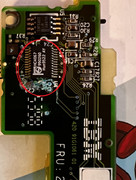
starting with your keyboard pcb and cable first, if you got a working keyboard, have the circuit board (called keyboard card connecting to batteries and speakers) replaced. If keyboard pcb and cable are good, then it might be some problems with/near hc4067.
BTW: 760 series laptops might suffer from an endless loop of error 163/161 while setting date/replacing battery won't work, 90% cases can be solved by replacing the keyboard (keyboard card/29H9221).
My case was some failed components caused by leakage, specifically, the hc4067
starting with your keyboard pcb and cable first, if you got a working keyboard, have the circuit board (called keyboard card connecting to batteries and speakers) replaced. If keyboard pcb and cable are good, then it might be some problems with/near hc4067.
BTW: 760 series laptops might suffer from an endless loop of error 163/161 while setting date/replacing battery won't work, 90% cases can be solved by replacing the keyboard (keyboard card/29H9221).
 510cs, 555bj, 860, Type 2435
WTB: 300C, 320, 700T, 710T
-
- Similar Topics
- Replies
- Views
- Last post
-
-
X1 Carbon 4th Gen -- Wonky Keyboard
by Scorpion8 » Thu Oct 23, 2025 9:40 pm » in ThinkPad X1 / X1-Carbon / X1-Extreme and later Series - 9 Replies
- 13705 Views
-
Last post by Scorpion8
Wed Nov 19, 2025 4:42 pm
-
-
-
WTB: T60/T60p 15” palm rest and keyboard bezel
by stanleylieber » Fri Oct 31, 2025 4:32 pm » in Marketplace - Forum Members only - 3 Replies
- 6555 Views
-
Last post by KAQSP
Thu Nov 20, 2025 6:33 pm
-
-
-
ThinkPad T25 ANSI US Keyboard from Amazon
by vermaden » Sun Nov 09, 2025 6:26 pm » in Thinkpad T25 Anniversary/Retro - 1 Replies
- 8275 Views
-
Last post by David C
Tue Jan 27, 2026 9:30 pm
-
-
-
X200T - no boot with keyboard plugged in - help.
by GloomySugar » Mon Nov 17, 2025 5:11 am » in ThinkPad X200/X201/X220 and X300/X301 Series - 0 Replies
- 5724 Views
-
Last post by GloomySugar
Mon Nov 17, 2025 5:11 am
-
Who is online
Users browsing this forum: No registered users and 80 guests