Take a look at our
ThinkPads.com HOME PAGE
For those who might want to contribute to the blog, start here: Editors Alley Topic
Then contact Bill with a Private Message

X1 Carbon Gen 12 - Yuck!

X1 / X1-Carbon (X1C) / X1-Extreme (X1E) Series/Generations
Post Reply
Message
Author
mikemex
Senior Member
Senior Member
Posts: 687
Joined: Mon Oct 04, 2010 8:54 pm
Location: Coyoacan, Mexico

X1 Carbon Gen 12 - Yuck!

#1 Post by mikemex » Sat Jan 20, 2024 9:49 pm

It seems like Lenovo is still trying to piss us off with unwanted changes. The new X1C12 is going to move the fingerprint sensor once again. From I think Gen 9 on the sensor was in the power button, like in many phones (from a cutout in the palmrest previously), but they now moved it to one of the keys in the keyboard, with is the most stupid thing I've ever heard. Well, maybe not from an OEM point of view, since they will probably save a few cables, a sub-card and some labor to connect the power button. I believe they relocated the power button to the side.

Why is it stupid? Because every time you replace the keyboard you'll have to pay for a fingerprint sensor too. It's like with motherboards: every time you replace a planar you have to ditch a processor, some memory and the wireless card. So much for saving the planet...

But above all, because they keep stealing keyboard keys. Since there is no more "print screen" key, there is probably a new keyboard combination / function to learn.

Also, they finally switched the Ctrl and Fn keys.

Image

But above all, Lenovo is still trying to kill the Trackpoint. They know that'd be the last nail in the coffin (for hardcore Thinkpad fans of course, there will always be someone buying their products Trackpoint or not) so they, AT LEAST, decided to give you the option. So I wasn't mistaken: the X1C12 will come without physical Trackpoint buttons (clickpad) in some version. BUT that's going to be optional because there will be a version with the buttons.

So there you have it: now the Trackpoint buttons are going to be optional.

To be fair, I've heard a lot of people complain about the touchpad (people who obviously has never used the Trackpoint) and Lenovo is just wanting to please that crowd.
Last edited by mikemex on Sun Jan 21, 2024 3:04 pm, edited 1 time in total.
X301: SU9600 | 8GB | 1TB | WXGA+
X1C9: 1185G7 | 32GB | 1TB | WUXGA | WWAN
X1Y8: 1365U | 32GB | 1TB | WUXGA
For the sake of ecology I donated all my classic Thinkpads.

TPFanatic
Senior ThinkPadder
Senior ThinkPadder
Posts: 2824
Joined: Thu Jul 30, 2015 11:29 pm

Re: X1 Carbon Gen 12 - Yuck!

#2 Post by TPFanatic » Sun Jan 21, 2024 12:42 am

The trackpoint buttons have been compromised since they got flattened and removed their hinged nature.

mikemex
Senior Member
Senior Member
Posts: 687
Joined: Mon Oct 04, 2010 8:54 pm
Location: Coyoacan, Mexico

Re: X1 Carbon Gen 12 - Yuck!

#3 Post by mikemex » Mon Jan 29, 2024 2:39 am

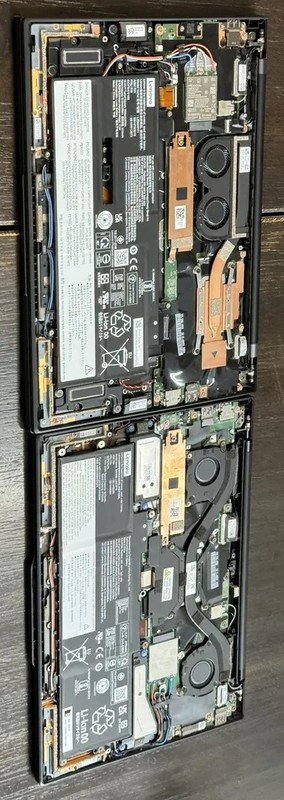
On the bright side, it seems like Lenovo did some serious re-design to the cooling system.

With the heat pipe installed that way, it essentially doubles the thermal transfer from the chip
(albeit the surface area for dissipation isn't doubled that way) and reduces thermal concentration.

It doesn't seem that crazy now to run 28W chips on an X1.

Image
Last edited by mikemex on Mon Jan 29, 2024 6:08 pm, edited 1 time in total.
X301: SU9600 | 8GB | 1TB | WXGA+
X1C9: 1185G7 | 32GB | 1TB | WUXGA | WWAN
X1Y8: 1365U | 32GB | 1TB | WUXGA
For the sake of ecology I donated all my classic Thinkpads.

astral
Junior Member
Junior Member
Posts: 389
Joined: Mon Apr 25, 2022 4:51 pm
Location: Ohio, USA

Re: X1 Carbon Gen 12 - Yuck!

#4 Post by astral » Mon Jan 29, 2024 10:05 am

Other problems aside - I'm sad to see the control and function keys switched. I've really come to prefer the Lenovo/IBM way in that regard - much more ergonomic to not have to stretch your finger as far when you need to hit it. You end up using control far more often than function, it makes sense to have it closer to where your fingers are in my opinion.
Operator of www.macdat.net - documenting your vintage laptops before they all crumble to dust!
Owns: X210Ai, T480, W541, Yoga S1, E545, W530, "T430p", X201, T61p (GMA), R60e, T43, G40, T30, T23, A22p, T21, i1482, i1260, 600X, 770ED, 385XD, 760XL, 560, 701C, 755C, 500, PS/Note 425

RealBlackStuff
Admin Emeritus
Admin Emeritus
Posts: 24724
Joined: Mon Sep 18, 2006 5:17 am
Location: Loch Garman, Éire

Re: X1 Carbon Gen 12 - Yuck!

#5 Post by RealBlackStuff » Mon Jan 29, 2024 11:04 am

Ctrl and Fn keys appear to be the same size, shouldn't be too much of a problem to swap the key caps.
Either also swap them in BIOS (if option still available) or use other keyboard programs.
Lovely day for a Guinness! (The Real Black Stuff)
But I actually prefer Murphy's from Cork!

astral
Junior Member
Junior Member
Posts: 389
Joined: Mon Apr 25, 2022 4:51 pm
Location: Ohio, USA

Re: X1 Carbon Gen 12 - Yuck!

#6 Post by astral » Mon Jan 29, 2024 11:25 am

I get that's possible and all, but the labels would still trip me up. I'd have to relabel them.
Operator of www.macdat.net - documenting your vintage laptops before they all crumble to dust!
Owns: X210Ai, T480, W541, Yoga S1, E545, W530, "T430p", X201, T61p (GMA), R60e, T43, G40, T30, T23, A22p, T21, i1482, i1260, 600X, 770ED, 385XD, 760XL, 560, 701C, 755C, 500, PS/Note 425

JPOESQ
**SENIOR** Member
**SENIOR** Member
Posts: 293
Joined: Sun May 16, 2004 2:26 pm
Location: San Francisco, CA
Contact:

Re: X1 Carbon Gen 12 - Yuck!

#7 Post by JPOESQ » Tue Jan 27, 2026 9:19 pm

I've been using my X1 G12 now for about 1-1/2 years and it has been performing fine but the black coating is wearing off the edges of the palmrest. I'm more than mildly annoyed. Any suggestions?
John P. O'Banion, JD, PE, BSEE
Registered Patent Attorney
http://www.intellectual.com

T530 (1vyrain bios), X1 Carbon G12, 3x M93p Tiny, 2x P3 Tiny

RealBlackStuff
Admin Emeritus
Admin Emeritus
Posts: 24724
Joined: Mon Sep 18, 2006 5:17 am
Location: Loch Garman, Éire

Re: X1 Carbon Gen 12 - Yuck!

#8 Post by RealBlackStuff » Wed Jan 28, 2026 3:28 am

Respray palmrest DIY or by the nearest bodyshop?

New palmrest, e.g.:
https://www.amazon.com/Laptop-PalmRest- ... B0DJXT3Y4M
Lovely day for a Guinness! (The Real Black Stuff)
But I actually prefer Murphy's from Cork!

JPOESQ
**SENIOR** Member
**SENIOR** Member
Posts: 293
Joined: Sun May 16, 2004 2:26 pm
Location: San Francisco, CA
Contact:

Re: X1 Carbon Gen 12 - Yuck!

#9 Post by JPOESQ » Wed Jan 28, 2026 9:20 am

Thanks RBS. Replacing the keyboard frame makes the most sense but I dread the tear-down required to replace that part.
John P. O'Banion, JD, PE, BSEE
Registered Patent Attorney
http://www.intellectual.com

T530 (1vyrain bios), X1 Carbon G12, 3x M93p Tiny, 2x P3 Tiny

RealBlackStuff
Admin Emeritus
Admin Emeritus
Posts: 24724
Joined: Mon Sep 18, 2006 5:17 am
Location: Loch Garman, Éire

Re: X1 Carbon Gen 12 - Yuck!

#10 Post by RealBlackStuff » Wed Jan 28, 2026 10:23 am

Lovely day for a Guinness! (The Real Black Stuff)
But I actually prefer Murphy's from Cork!

JPOESQ
**SENIOR** Member
**SENIOR** Member
Posts: 293
Joined: Sun May 16, 2004 2:26 pm
Location: San Francisco, CA
Contact:

Re: X1 Carbon Gen 12 - Yuck!

#11 Post by JPOESQ » Wed Jan 28, 2026 11:25 am

Thanks again RBS. I just finished viewing a few of the videos and reading the HMM. The computer needs to be gutted, which I did for my Gen 5 and swore that I would never do it again. How I long for the good old days when the bottom of the computer was the base instead of the keyboard frame. :?
John P. O'Banion, JD, PE, BSEE
Registered Patent Attorney
http://www.intellectual.com

T530 (1vyrain bios), X1 Carbon G12, 3x M93p Tiny, 2x P3 Tiny

RealBlackStuff
Admin Emeritus
Admin Emeritus
Posts: 24724
Joined: Mon Sep 18, 2006 5:17 am
Location: Loch Garman, Éire

Re: X1 Carbon Gen 12 - Yuck!

#12 Post by RealBlackStuff » Wed Jan 28, 2026 11:56 am

Or get a 4-part vinyl cover set for it: https://www.ebay.com/itm/326778643549
Lovely day for a Guinness! (The Real Black Stuff)
But I actually prefer Murphy's from Cork!

JPOESQ
**SENIOR** Member
**SENIOR** Member
Posts: 293
Joined: Sun May 16, 2004 2:26 pm
Location: San Francisco, CA
Contact:

Re: X1 Carbon Gen 12 - Yuck!

#13 Post by JPOESQ » Wed Jan 28, 2026 12:03 pm

I used that option on a heavily scratched X1 carbon several years ago and found it to be very successful. IIRC, I found my skin in eBay.
John P. O'Banion, JD, PE, BSEE
Registered Patent Attorney
http://www.intellectual.com

T530 (1vyrain bios), X1 Carbon G12, 3x M93p Tiny, 2x P3 Tiny

Post Reply
  • Similar Topics
    Replies
    Views
    Last post

Return to “ThinkPad X1 / X1-Carbon / X1-Extreme and later Series”

Who is online

Users browsing this forum: No registered users and 26 guests