


 Homepage
 Forum
Forum Drivers
 HMM-Manuals
 MTM
MTM Feed
Feed
Hello all,
My thinkpad 600E stopped working when restarting from BIOS after doing a system self test.
Was running a system self test after getting the 08611 track point error on startup, the errors came up when the motherboard test was in progress, then once that was finished, I pressed restart in the setup and just as the machine went to restart, it shut off and won't turn back on again, seem to make the AC adapter cut out too as the low battery light stops blinking too and i can hear a faint squealing from near the PSU input jack.
Power sequencing thing from powering the laptop with the battery instead of the AC charger when being powered on? (dont know how to explain my mental picture of the probable power up sequence when the laptop is powered up on the AC adapter)
It does stay powered when the battery is plugged in, but it cant start cause its bad. when the battery is removed from the machine it just cuts out and doesnt do anything (battery status LED doesnt blink anymore until AC adapter is unplugged and plugged back in.
Was also running for a hour or two prior.
The PSU used was a Genuine IBM power supply IBM FRU 02K6555
thanks
Take a look at our
ThinkPads.com HOME PAGE
For those who might want to contribute to the blog, start here: Editors Alley Topic
Then contact Bill with a Private Message
ThinkPads.com HOME PAGE
For those who might want to contribute to the blog, start here: Editors Alley Topic
Then contact Bill with a Private Message
Thinkpad 600E doesnt turn on
-
ThinkpadW500
- Posts: 5
- Joined: Sat Aug 28, 2021 6:13 am
- Location: Melbourne, Australia
-
axur-delmeria
- Senior ThinkPadder

- Posts: 4416
- Joined: Mon May 28, 2012 5:49 am
- Location: Metro Manila, Philippines
Re: Thinkpad 600E doesnt turn on
You'll probably need high-level electronics and troubleshooting skills to fix this one. It's similar to the restoration work fellow forum members panips and solidpro perform on ancient Thinkpads.
Planned Purchase: T480s i5-8350 FHD Touch
Impulse Buy: Thinkpad not named for safety reasons
RIP: X220 4291-C91 X61 7676-A24 760XD-U9E
Impulse Buy: Thinkpad not named for safety reasons
RIP: X220 4291-C91 X61 7676-A24 760XD-U9E
Re: Thinkpad 600E doesnt turn on
I'm afraid your 600E has a dead short on the main power rail per the squealing and PSU cutout...
I had a similar syndrome with a 600X I picked up from eBay. The repair process involved voltage injection and a thermal camera. If you're up for the challenge, here is the workflow I'd recommend:
1) Strip it down: Remove everything, CPU, RAM, CMOS battery, etc., until you have just the bare motherboard.
2) Visual Inspection: Check for any obviously charred or cracked tantalum capacitors or MOSFETs. Desolder any suspicious components and check the rail's resistance again.
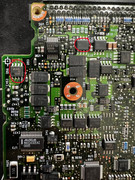
3) Voltage Injection: Use a bench power supply to inject 1V to 2V (with a 1A current limit) through the DC jack. Use a thermal camera (or the rosin flux method) to locate any hot spots. In my case, the P-channel MOSFET Q56 heated up almost instantly. I then measured its resistance to ground on both the input and output pins.
4) Isolate the Short:
If the input pin shows near 0 ohms to ground: Desolder and replace the MOSFET, then retest.
If the output pin is shorted: Inject voltage directly into the output pad to find the next "downstream" component that's heating up.
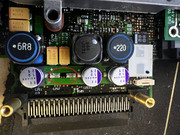
For my board, the culprit was a purple 10uF conductive polymer aluminum solid capacitor. After removing it, the resistance returned to a healthy 60 ohms.
5) Rinse and Repeat: Continue this injection and testing cycle until the short is cleared.
My case was a bit unusual, I've rarely seen those polymer aluminum capacitors fail short; it’s almost always the tantalum caps that blow and cause a dead short in these vintage ThinkPads.
Good luck with the rescue!
I had a similar syndrome with a 600X I picked up from eBay. The repair process involved voltage injection and a thermal camera. If you're up for the challenge, here is the workflow I'd recommend:
1) Strip it down: Remove everything, CPU, RAM, CMOS battery, etc., until you have just the bare motherboard.
2) Visual Inspection: Check for any obviously charred or cracked tantalum capacitors or MOSFETs. Desolder any suspicious components and check the rail's resistance again.
3) Voltage Injection: Use a bench power supply to inject 1V to 2V (with a 1A current limit) through the DC jack. Use a thermal camera (or the rosin flux method) to locate any hot spots. In my case, the P-channel MOSFET Q56 heated up almost instantly. I then measured its resistance to ground on both the input and output pins.
4) Isolate the Short:
If the input pin shows near 0 ohms to ground: Desolder and replace the MOSFET, then retest.
If the output pin is shorted: Inject voltage directly into the output pad to find the next "downstream" component that's heating up.
For my board, the culprit was a purple 10uF conductive polymer aluminum solid capacitor. After removing it, the resistance returned to a healthy 60 ohms.
5) Rinse and Repeat: Continue this injection and testing cycle until the short is cleared.
My case was a bit unusual, I've rarely seen those polymer aluminum capacitors fail short; it’s almost always the tantalum caps that blow and cause a dead short in these vintage ThinkPads.
Good luck with the rescue!
510cs, 555bj, 860, Type 2435WTB: 300C, 320, 700T, 710T
-
- Similar Topics
- Replies
- Views
- Last post
-
-
Thinkpad T60 won't turn on
by cynthiacarmichael » Thu Mar 26, 2026 4:40 am » in ThinkPad T60/T61 Series - 1 Replies
- 938 Views
-
Last post by Glaurung-quena
Thu Mar 26, 2026 9:34 am
-
-
-
Got a 600E, but I have some questions about it
by khozmos » Thu Jan 22, 2026 10:36 am » in ThinkPad Legacy Hardware - 3 Replies
- 4295 Views
-
Last post by khozmos
Thu Jan 22, 2026 4:46 pm
-
-
- 0 Replies
- 1650 Views
-
Last post by MDBenson
Mon Mar 02, 2026 3:35 am
-
-
WTB: 600E Replacement LCD panel & ribbon (UK)
by MDBenson » Wed Mar 04, 2026 6:14 am » in Marketplace - Forum Members only - 0 Replies
- 1881 Views
-
Last post by MDBenson
Wed Mar 04, 2026 6:14 am
-
Who is online
Users browsing this forum: No registered users and 41 guests